
Poppy - Live Video Chat
Wolf Club StudioSocial
4.754.00 Reviews
- Version
- 1.1.5
- Installs
- 500.00K
- Age Rating
- Mature 17+
Screenshots





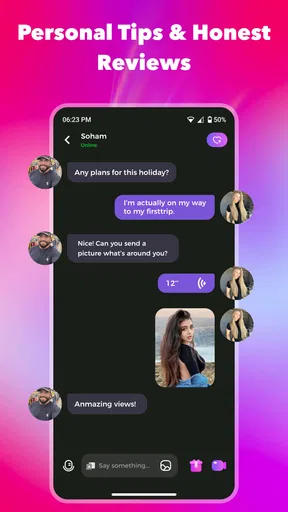
Our Review of Poppy - Live Video Chat
 Analysis by Appyee
I approached Poppy - Live Video Chat as a social app for people who want spontaneous face-to-face conversations rather than carefully planned messaging. Its basic idea is easy to understand: connect with strangers through random video chat and see where the conversation goes. In practice, that makes the quality of your experience depend heavily on your internet connection, your surroundings, and your willingness to handle unpredictable interactions.
That unpredictability is both the attraction and the main warning. I would not compare Poppy with a normal messenger where you choose contacts and control every conversation. It feels closer to opening a window into a stream of brief encounters. Some chats may be pleasant, some may end immediately, and others may simply feel awkward. If you enjoy meeting unknown people without a long setup process, the format can be appealing. If you want dependable conversations with people you already know, this is probably the wrong tool.
How Poppy feels when the connection is doing the work
The app comes from Wolf Club Studio and sits in the social category. It is free to install, with optional purchases ranging from $0.99 to $99.99 per item. That makes the initial decision fairly simple: you can try the core experience without paying at the door, but you should still pay attention to any purchase prompts before confirming anything.
My first practical observation is that random video chat exposes network problems much more clearly than text-based social apps. A delayed message can still be understood, but a frozen face, broken audio, or a sudden drop in image quality changes the whole mood of a live conversation. Poppy is therefore at its best when your connection is stable and you are somewhere with enough bandwidth for continuous video and sound.
This is not just a technical detail. When a stranger cannot hear you properly, they have little reason to wait. A short silence can look like disinterest, even when the real problem is a weak signal. I found it useful to give a quick verbal explanation when the picture began to stutter, then decide whether to continue or move on. That small habit avoids wasting time trying to rescue a conversation that neither person can comfortably follow.
Video chat also makes your physical environment part of the experience. A noisy room, bright light behind you, or people walking through the background can make a simple conversation feel uncomfortable. Before opening a session, I would check the camera angle, move away from loud appliances, and use headphones if the surroundings are busy. These are ordinary adjustments, but they matter more here than they would in a text-first social network.
A useful way to think about Poppy is as a quick social activity rather than a guaranteed source of meaningful friendship. The random format removes the effort of searching through profiles or composing an opening message, but it also removes much of the context that helps two people decide whether they have something in common. You need to be comfortable starting from almost nothing.
What makes short mobile sessions practical
Poppy makes the most sense in small pockets of free time: while taking a break at home, after finishing a task, or when you feel like talking but do not want to arrange a call with a friend. I would avoid using it when I was already rushed. A random conversation can end quickly, but it can also continue longer than expected, and the switching between strangers takes attention.
On a phone, convenience comes with trade-offs. Holding the device for a while can become tiring, especially if you are trying to keep your face centered and the camera steady. A simple stand or a supported position helps, but it also makes you more aware of what is visible behind you. I recommend checking the frame before starting rather than adjusting it repeatedly during a conversation.
Mobile data deserves careful thought. Continuous video can use a meaningful amount of your allowance, and Poppy is not the kind of app I would open casually when a limited data plan is nearly exhausted. Wi-Fi is the safer choice for longer sessions, while mobile data is better reserved for brief use when you already know your connection is reliable. I would also avoid using it in places where the signal changes constantly, such as moving vehicles or crowded transit areas.
That does not mean every mobile session needs perfect conditions. A short exchange can work well on an ordinary phone if the signal remains steady and the camera is usable. The important distinction is between a momentary quality dip and a connection that repeatedly collapses. In the first case, patience may be enough. In the second, continuing usually makes the experience frustrating for both sides.
Another mobile consideration is privacy in public spaces. Video chat can reveal more than you intend: a workplace, a street sign, a school uniform, or personal items in the background. I would use a neutral setting and avoid showing documents, screens, house numbers, or anything that identifies where I am. This is especially important because the person on the other side is a stranger, not someone whose identity I already understand.
Handling interruptions without losing control
Random video chat is naturally vulnerable to interruptions. A notification, a call, a weak signal, or a person entering the room can break the flow. My advice is to treat each conversation as disposable until trust has been earned. Do not feel pressured to explain every interruption or continue simply because the other person seems interested.
If the video freezes, I would first check whether the problem is local: moving closer to the router, changing position, or closing other demanding apps may help. If the issue continues, ending the session and trying again later is more sensible than repeatedly waiting through silence. The app’s value comes from the conversation, not from proving that a broken connection can be forced to work.
Recovery is also social. If the image returns after a brief interruption, a simple “the connection dropped for a moment” is enough. There is no need to over-apologize. On the other hand, if the other person becomes aggressive, sexual, manipulative, or simply makes you uncomfortable, I would leave immediately. The random nature of the service means you do not owe a stranger continued access to your time or camera.
That point is particularly important because the app carries a Mature 17+ content rating. I would interpret that as a clear signal to approach the service with adult-level caution, not as a promise that every interaction will be mature or respectful. Anyone under the stated age should not use it, and parents should not treat the rating as a substitute for supervision or conversation about online strangers.
For adults, the safest workflow is straightforward: begin without revealing personal details, keep the background controlled, and end the chat as soon as the interaction crosses a boundary. I would not share a phone number, home address, workplace details, private social accounts, or financial information during a first encounter. If a conversation becomes promising, trust should develop slowly and outside the pressure of a live random session.
Using the app without wasting data or patience
Because Poppy is built around live video, I would use it deliberately rather than leaving it open in the background. Decide what you want from the session before starting: a few light conversations, a chance to practice speaking with unfamiliar people, or simply a change from your usual social routine. Having that intention makes it easier to stop when the experience is no longer enjoyable.
One non-obvious advantage of short sessions is that they let you test your setup before committing. Start in a quiet place, check whether your voice is clear, and watch for early signs of unstable video. If the first connection is already struggling, changing location before continuing can save both data and frustration. This is more efficient than waiting through several failed conversations and assuming every stranger is the problem.
I would also avoid multitasking while chatting. Streaming, uploading files, or running several network-heavy services at the same time can make a marginal connection worse. Even when the phone appears responsive, live video needs consistent delivery, not just occasional bursts of speed. Closing unnecessary activity can improve the experience without changing any setting inside the app.
Another useful habit is to keep sessions short when using mobile data and reserve longer conversations for a dependable Wi-Fi connection. This is not a criticism of Poppy so much as a realistic consequence of its format. Text-based alternatives are more forgiving when the network is weak, while video chat makes every interruption visible and audible.
The app can also suit people who find traditional social platforms tiring. There is no need to build a polished profile before speaking, and you do not have to spend a long time browsing posts. That simplicity is refreshing when I want immediate interaction. The trade-off is that the lack of preparation can produce shallow or unsuitable matches, so anyone seeking carefully filtered communities may prefer a platform organized around interests, contacts, or established groups.
Where it fits beside familiar social alternatives
Compared with messaging apps, Poppy is more immediate and less predictable. A regular messenger gives you control over who can contact you, when you reply, and how much personal context you share. Poppy removes much of that control in exchange for the possibility of an instant conversation with someone new. I would choose the messenger for maintaining relationships and Poppy for spontaneous encounters.
Compared with social networks built around posts and profiles, Poppy has less emphasis on public identity and ongoing content. That can feel lighter because you are not expected to present a carefully edited version of yourself. It can also feel thinner because a random video chat offers little information before the interaction begins. If shared interests are important to you, a community-based service may be a better match.
Compared with planned video-call tools, Poppy is faster but less dependable socially. Scheduled calls work well when you already know who will be present and what the conversation is for. Poppy is better suited to curiosity and casual experimentation. I would not use it for work, family communication, appointments, or any discussion where reliability and identity matter.
The strongest case for Poppy is therefore quite specific: you want to speak with strangers, you accept that many conversations will be brief, and you can provide a stable connection and a private setting. The weakest case is equally clear: you dislike surprises, have limited data, need strong control over contacts, or are looking for a structured community with shared interests.
Version, reach, and the practical decision to install
The current version is 1.1.5, and the app requires Android 8.0 or later. It has reached over 500 thousand installs and holds a 4.7 average from around 1.5 thousand ratings, which suggests that the concept has found an audience. I would treat that positive reception as encouraging, but not as a guarantee that every random interaction will suit every user.
Its free entry point makes experimentation reasonable, especially if you already have a compatible phone and a stable connection. Still, the optional purchase range is broad enough that I would review each confirmation screen carefully. Do not assume that “free” means every part of the experience is without cost, and do not buy anything simply because a conversation was enjoyable. Decide in advance whether you are willing to spend at all.
For a realistic everyday scenario, imagine finishing dinner and wanting ten minutes of conversation while your friends are unavailable. In a quiet room on Wi-Fi, Poppy can fill that gap quickly. You can meet someone, exchange a few thoughts, and leave without arranging a future call. The same situation becomes much less attractive on a crowded bus with headphones failing, a weak signal, and people visible behind you. The app has not changed; the context has.
I would also recommend it to someone practicing confidence in brief conversations, provided they understand that strangers may not be patient or compatible. It can encourage quick introductions and help you become more comfortable with conversational uncertainty. It is not a replacement for supportive friendships or a moderated learning environment, but it can offer low-commitment social practice.
On the other hand, I would skip it if I were feeling vulnerable, exhausted, or unwilling to deal with abrupt endings. Random chat can be emotionally uneven. A person may disconnect without explanation, and that says more about the format than about you. If you need reassurance, continuity, or a carefully managed environment, choose a familiar contact-based service instead.
My connectivity verdict
After looking at the app through the lens of connection quality, I see Poppy as a focused social experiment rather than an all-purpose communication tool. Its appeal comes from immediacy: open the app, meet a stranger, and decide in the moment whether the exchange is worth continuing. That works best when your network is steady, your surroundings are private, and your expectations are modest.
The biggest strength is the low barrier to spontaneous video conversation. The biggest weakness is that the same spontaneity removes control over compatibility, privacy, and reliability. Network trouble magnifies the problem, and mobile data can make casual use less casual than it first appears. Good preparation—quiet surroundings, a controlled background, a stable connection, and a clear stopping point—makes a noticeable difference.
With its free access, Mature 17+ rating, support for Android 8.0 and later, and growing audience, Poppy is worth trying for adults who genuinely want random video chat with strangers. I would recommend it as an occasional, intentional activity rather than something to leave running throughout the day. Choose Poppy when spontaneity is the point; choose a traditional messenger or planned video call when reliability and trust matter more.
Verdict
Strengths of Poppy - Live Video Chat
- Quick matching makes it easy to start conversations with new people.
- Video and text chat options suit different comfort levels.
- Simple interface is easy to navigate for first-time users.
- Live interactions feel more personal than standard messaging apps.
- Useful for meeting people from different countries and cultures.
Limitations of Poppy - Live Video Chat
- Some users may behave inappropriately during live conversations.
- Matching quality can vary depending on your location and activity.
- Frequent notifications may become distracting without careful settings.
- A stable internet connection is needed for smooth video calls.
- Privacy-conscious users may dislike interacting with strangers on camera.
Similar Picks in This Category
View All
Meta Platforms, Inc.4.6

Instagram4.0

Likee-Live, Chat & Party Games
Likeme Pte. Ltd.4.4

Facebook Lite
Meta Platforms, Inc.4.5

TikTok - Videos, Shop & LIVE
TikTok Pte. Ltd.4.0

Moj: Free Short Drama & Reels
ShareChat4.1
Frequently Asked Questions
What is Poppy - Live Video Chat, and how does it work?
Poppy - Live Video Chat is a social communication app designed for meeting and chatting with people through live video interactions. After creating a profile, users can browse available contacts or suggested matches and start conversations using video, text, or other in-app features. The experience depends on the people online, so connection quality and response times may vary.
Is Poppy - Live Video Chat free to download and use?
The app can generally be downloaded without an upfront charge, but some features may require in-app purchases, virtual credits, subscriptions, or other paid options. Before starting a conversation, check the pricing details shown inside the app and review any recurring subscription terms carefully. Availability of free messaging or video minutes may also depend on your account and location.
Is Poppy - Live Video Chat safe for teenagers and children?
Users should review Poppy’s official age rating and terms before installing it. Live video platforms can expose people to strangers, unexpected content, scams, or inappropriate behavior, particularly when conversations are not fully moderated. Children and younger teenagers should not use the service without appropriate parental supervision. Never share your address, school, passwords, financial information, or private photographs.
What permissions and internet connection does Poppy require?
Because Poppy focuses on live communication, it may request access to the camera and microphone, along with notifications and possibly photos or storage depending on the features you use. Camera and microphone access are necessary for video calls, but you can manage permissions through your phone’s settings. A stable Wi-Fi or mobile-data connection is recommended to reduce delays and dropped calls.
How can I report, block, or manage unwanted users on Poppy?
If another user behaves abusively, sends inappropriate material, pressures you for personal information, or violates the app’s rules, use the available profile or chat controls to block and report that account. Save relevant evidence when appropriate, then contact Poppy’s support team through the in-app help section. You should also review privacy settings and limit who can contact or interact with you.
